
Parsing examples
Some examples on parsing to and from supported formats. More info about all parsing methods can be found in the manual section.
Declare paths
First, let's do all the necessary imports and generate the paths that we'll use for file import and export.
[1]:
%matplotlib inline

from pathlib import Path
import pygaps.parsing as pgp

# Get directory paths
base_path = Path.cwd() / 'data' / 'parsing'

# Find files
aif_file_paths = list((base_path / 'aif').rglob('*.aif'))
json_file_paths = list((base_path / 'json').rglob('*.json'))
xl_file_paths = list((base_path / 'excel').rglob('*.xls'))
csv_file_paths = list((base_path / 'csv').rglob('*.csv'))
Manufacturer import
Many report files from various adsorption device manufacturers can be imported directly using pyGAPS. Here are some examples.
[2]:
cfld = base_path / "commercial"
dvssms = pgp.isotherm_from_commercial(cfld / "smsdvs" / "13X water 30c.xlsx", 'smsdvs', 'xlsx')
micromeritics = pgp.isotherm_from_commercial(cfld / "mic" / "Sample_C.xls", 'mic', 'xl')
belsorp_dat = pgp.isotherm_from_commercial(cfld / "bel" / "DUT-13-CH4-190K.DAT", 'bel', 'dat')
threeP_xl = pgp.isotherm_from_commercial(cfld / "3p" / "MOF_N2_77K.xlsx", '3p', 'xl')
quantachrome = pgp.isotherm_from_commercial(
    cfld / "qnt" / "DUT-6_N2_77K (Raw Analysis Data).txt", 'qnt', 'txt-raw'
)
Specified adsorbate is not in internal list (or name cannot be resolved to an existing one). Thermodynamic backend disabled for this gas/vapour.
No data collected for pressure_saturation in file c:\Users\pauli\git\pyGAPS\docs\examples\data\parsing\commercial\mic\Sample_C.xls.
AIF Parsing
AIF Import
Adsorption information files are fully supported in pyGAPS, both for import and exports. Isotherms can be imported from an .aif as:
[3]:
# Import all
isotherms = [pgp.isotherm_from_aif(path) for path in aif_file_paths]

# Display an example file
print(next(isotherms))
Material: DMOF
Adsorbate: ethane
Temperature: 298.15K
Units:
        Uptake in: cm3(STP)/g
        Pressure in: kPa
Other properties:
        user: single gas
        date: 2019-08-19T00:00:00
        instrument: BEL VC-05
        material_mass: 0.817
        material_batch: [Zn2(tm-bdc)2(dabco)]
        material_mass_unit: g
AIF Export
Similarly, an isotherm can be exported as an AIF file or a string, depending on whether a path is passed. For this purpose use either the module pygaps.isotherm_to_aif() function or the convenience class function to_aif().
[4]:
# module function
for isotherm, path in zip(isotherms, aif_file_paths):
    pgp.isotherm_to_aif(isotherm, path)

# save to file with convenience function
isotherms[0].to_aif('isotherm.aif')

# string
isotherm_string = isotherms[0].to_aif()
JSON Parsing
JSON Import
Isotherms can be imported either from a json file or from a json string. The same function is used in both cases.
[5]:
# Import them
isotherms = [pgp.isotherm_from_json(path) for path in json_file_paths]

# Display an example file
print(next(isotherms))
Material: TEST
Adsorbate: n-butane
Temperature: 298.15K
Units:
        Uptake in: g/g
        Pressure in: bar
Other properties:
        iso_type: isotherm
        material_batch: TB
JSON Export
Exporting to JSON can be done to a file or a string, depending on whether a path is passed. For this purpose use either the module pygaps.isotherm_to_json() function or the convenience class function to_json().
[6]:
# module function
for isotherm, path in zip(isotherms, json_file_paths):
    pgp.isotherm_to_json(isotherm, path, indent=4)

# save to file with convenience function
isotherms[0].to_json('isotherm.json')

# string
isotherm_string = isotherms[0].to_json()
Excel Parsing
Excel does not have to be installed on the system in use.
Excel Import
[7]:
# Import them
isotherms = [pgp.isotherm_from_xl(path) for path in xl_file_paths]

# Display an example file
print(next(isotherms))
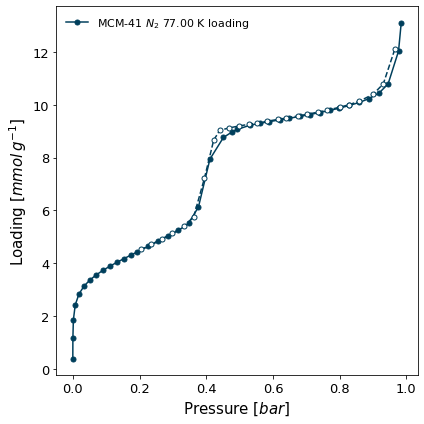
Material: MCM-41
Adsorbate: nitrogen
Temperature: 77.0K
Units:
        Uptake in: mmol/g
        Pressure in: bar
Other properties:
        comment: None
        date: None
        lab: MADIREL
        instrument: Triflex
        project: None
        activation_temperature: 150.0
        user: PI
        iso_type: Isotherme
        material_batch: Test
[8]:
isotherms[1].plot()
Excel Export
[9]:
# Export each isotherm in turn
for isotherm, path in zip(isotherms, xl_file_paths):
    pgp.isotherm_to_xl(isotherm, path)

# save to file with convenience function
isotherms[0].to_xl('isotherm.xls')
CSV Parsing
CSV Import
Like JSON, isotherms can be imported either from a CSV file or from a CSV string. The same function is used in both cases.
[10]:
# Import them
isotherms = [pgp.isotherm_from_csv(path) for path in csv_file_paths]

# Display an example file
print(next(isotherms))
Material: HKUST-1(Cu)
Adsorbate: carbon dioxide
Temperature: 303.0K
Units:
        Uptake in: mmol/g
        Pressure in: bar
Other properties:
        material_batch: Test
        iso_type: Calorimetrie
        user: ADW
        machine: CV
        date: 21/05/2010 00:00
        activation_temperature: 150.0
        lab: MADIREL
CSV Export
[11]:
# Export each isotherm in turn
for isotherm, path in zip(isotherms, csv_file_paths):
    pgp.isotherm_to_csv(isotherm, path)

# save to file with convenience function
isotherms[0].to_csv('isotherm.csv')

# string representation
isotherm_string = isotherms[0].to_csv()